
QR codes have become ubiquitous in our daily lives—from restaurant menus to product packaging, payment systems to boarding passes. But have you ever wondered about the technology behind those black and white squares? How does your smartphone transform those patterns into meaningful information?
Let’s dive deep into the fascinating technology that makes QR codes work.
🏗️ The Anatomy of a QR Code
A QR (Quick Response) code isn’t just a random pattern. It’s a carefully structured data container with specific components:
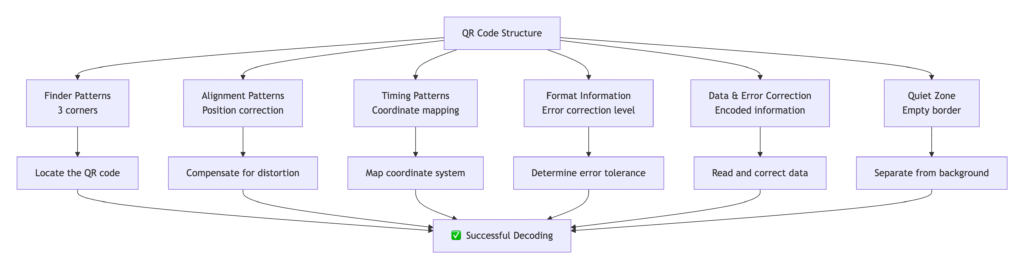
1. Finder Patterns 🎯
- Three identical patterns at corners
- Help scanners locate and orient the QR code
- Always the same 7×7 black/white pattern
2. Alignment Patterns 📍
- Smaller position markers throughout the code
- Help with distortion correction when code is curved or angled
- Number varies based on QR code version
3. Timing Patterns ⏱️
- Alternating black and white modules between finder patterns
- Help determine the size of individual data modules
- Act as a coordinate system for the scanner
4. Format Information 📊
- Contains error correction level and mask pattern
- Located near finder patterns
- Duplicated for redundancy
5. Data & Error Correction 💾
- The actual encoded information
- Error correction data interleaved with main data
- Allows reading even if partially damaged
6. Quiet Zone 🔳
- Empty white border around the code
- Essential for proper scanning
- Minimum 4 modules wide
🔄 The QR Code Scanning Process: Step by Step
Step 1: Detection & Location
What happens: Your camera captures the image and the scanning software:
- Identifies the three finder patterns
- Confirms it’s looking at a QR code
- Determines the code’s orientation and size
Technology used: Computer vision algorithms detect the specific ratio patterns (1:1:3:1:1) that identify finder patterns.
Step 2: Perspective Correction
What happens: If the QR code is angled or curved, the software:
- Uses alignment patterns to map the distortion
- Applies mathematical transformations
- Creates a “flat” version for reading
Technology used: Homography matrix transformations to correct perspective.
Step 3: Grid Mapping
What happens: The system establishes a coordinate grid:
- Uses timing patterns to determine module size
- Creates a precise grid over the entire code
- Maps each position to a specific data bit
Technology used: Linear interpolation between timing pattern points.
Step 4: Data Extraction
What happens: The scanner reads the actual data:
- Reads format information first
- Determines error correction level and mask pattern
- Extracts data modules in specific sequence
- Applies mask pattern to decode actual values
Technology used: Reed-Solomon error correction decoding.
Step 5: Error Correction & Validation
What happens: The system ensures data integrity:
- Uses error correction codes to fix mistakes
- Can recover data even if 30% of code is damaged
- Validates the decoded information
Technology used: Error correction algorithms reconstruct missing data.
Step 6: Content Processing
What happens: The decoded data is processed:
- Identifies data type (URL, text, contact, etc.)
- Takes appropriate action (open browser, save contact, etc.)
- Presents results to the user
Technology used: Pattern matching and protocol handlers.
💾 Data Encoding: How Information is Stored
Data Capacity by QR Code Type:
| QR Code Type | Numeric Only | Alphanumeric | Binary | Kanji |
|---|---|---|---|---|
| Small (21×21) | 41 characters | 25 characters | 17 bytes | 10 characters |
| Version 40 (177×177) | 7,089 characters | 4,296 characters | 2,953 bytes | 1,817 characters |
Encoding Modes:
- Numeric (0-9): Most efficient, 3.3 characters per 10 bits
- Alphanumeric (0-9, A-Z, space, $%*+-./:): 2 characters per 11 bits
- Byte mode (ISO-8859-1): 1 character per 8 bits
- Kanji (Shift JIS): Japanese characters, 1 character per 13 bits
Error Correction Levels:
| Level | Recovery Capacity | Use Cases |
|---|---|---|
| L (Low) | 7% of data | Small codes, high quality printing |
| M (Medium) | 15% of data | General purpose, standard use |
| Q (Quartile) | 25% of data | Outdoor, industrial use |
| H (High) | 30% of data | Critical applications, damaged surfaces |
🎨 The Magic of Masks: Why QR Codes Look Different
QR codes use mask patterns to avoid problematic patterns that might confuse scanners:
Common Mask Patterns:
- (x + y) mod 2 = 0
- y mod 2 = 0
- x mod 3 = 0
- (x + y) mod 3 = 0
- ((x/3) + (y/2)) mod 2 = 0
- ((x*y) mod 2) + ((x*y) mod 3) = 0
- (((x*y) mod 2) + ((x*y) mod 3)) mod 2 = 0
- (((x+y) mod 2) + ((x*y) mod 3)) mod 2 = 0
The scanner automatically detects which mask was used and applies the inverse pattern to recover the original data.
🔢 QR Code Versions and Sizes
QR codes come in 40 versions, from 21×21 to 177×177 modules:
| Version | Modules | Data Capacity | Typical Use |
|---|---|---|---|
| 1 | 21×21 | 25 characters | URLs, short texts |
| 10 | 57×57 | 432 characters | Contact information |
| 25 | 117×117 | 2,123 characters | Large documents |
| 40 | 177×177 | 4,296 characters | Maximum capacity |
🌈 Beyond Black and White: Colored QR Codes
Can QR codes be colored?
Yes, but with limitations:
- Contrast is crucial – light/dark distinction must remain
- Safe colors: Dark blue, green, brown on light backgrounds
- Avoid red – many cameras have red filters
- Gradient effects can work if contrast is maintained
Creative QR Codes:
- Logo insertion in center (if error correction is high)
- Rounded edges and stylized elements
- Color gradients that maintain readability
- Background images with sufficient quiet zone
🔒 Security Aspects: How QR Codes Can Be Misused
Potential Risks:
- Malicious redirects to phishing sites
- Auto-download of harmful files
- Automatic actions (calling numbers, sending emails)
- Fake codes placed over legitimate ones
Protection Measures:
- Use scanners that preview URLs before opening
- Check the source of QR codes
- Avoid scanning random codes in public places
- Use security software with QR code scanning protection
QR Code Technology FAQ
Understanding how QR codes work from a technical perspective
How can QR codes still work when partially damaged or dirty?
QR codes use Reed-Solomon error correction, a mathematical algorithm that adds redundant data to the original information. This allows scanners to reconstruct missing or damaged parts through polynomial calculations.
- L (Low): 7% data recovery
- M (Medium): 15% data recovery
- Q (Quartile): 25% data recovery
- H (High): 30% data recovery
The error correction data is interleaved throughout the code, so even if one area is damaged, the scanner can use information from other areas to reconstruct the missing data.
What’s the maximum amount of data a QR code can store?
The storage capacity depends on the QR code version and encoding mode. The largest standard QR code (Version 40) can store:
Why do some QR codes scan instantly while others take longer?
Scanning speed is influenced by multiple technical factors:
Larger QR codes (more modules) require more processing time to decode.
Blurry, poorly lit, or low-contrast codes take longer to process and decode accurately.
Higher error correction levels (H, Q) require more computational power to verify and correct data.
Older devices with slower processors and less optimized scanning algorithms take longer.
How does the scanner know where to start reading the data?
QR codes follow a strict reading sequence defined by international standards (ISO/IEC 18004):
The scanner locates the three identical finder patterns in the corners using their unique 1:1:3:1:1 ratio.
Using the finder patterns, the scanner establishes the code’s rotation and corrects perspective distortion.
The scanner reads the format area near finder patterns to determine error correction level and mask pattern.
Data is read in a specific zig-zag pattern starting from the bottom-right corner moving upward.
What makes QR codes better than traditional barcodes?
QR codes offer significant technical advantages over traditional 1D barcodes:
QR codes can store hundreds of times more information in the same space compared to 1D barcodes.
Can be scanned from any orientation, unlike 1D barcodes that require specific alignment.
Can recover data even when partially damaged, while 1D barcodes fail with minor damage.
Parallel data reading allows quicker decoding compared to sequential reading of 1D barcodes.
Can QR codes be custom designed with colors and logos?
Yes, but with important technical considerations to maintain scannability:
Maintain sufficient contrast between dark and light areas. Dark colors should replace black modules, light colors replace white modules.
Logos can be added in the center if error correction level is set to High (H) to compensate for obscured data.
Avoid red tones as many cameras have red filters. Stick to high-contrast color combinations like dark blue/light yellow.
Always maintain the empty border (quiet zone) around the QR code – minimum 4 modules wide.
🚀 The Future of QR Codes
Emerging Technologies:
- Dynamic QR codes with changeable content
- Secure QR codes with encryption
- Mini QR codes for small spaces
- Color QR codes with additional data layers
- 3D QR codes on products and buildings
Industry Applications:
- Healthcare – patient records, medication tracking
- Manufacturing – inventory management, quality control
- Retail – product information, authentication
- Transportation – ticketing, tracking, navigation
🎯 Key Takeaways
- QR codes are sophisticated data containers with precise structure
- Error correction enables reliability even with damage or poor scanning conditions
- The scanning process involves multiple steps from detection to data extraction
- QR codes can store various data types with different efficiency levels
- Custom designs are possible but must maintain technical requirements
The next time you scan a QR code, you’ll appreciate the complex technology working behind the scenes to deliver that instant connection between physical and digital worlds!