
In a world where speed and convenience are king, the humble QR (Quick Response) code has become a payment powerhouse. From bustling street vendors to high-end retail stores, that little square of black and white pixels has revolutionized how we transfer money. But have you ever wondered what’s happening in the seconds between your phone’s beep and the “Payment Successful” message?
Let’s break down the magic behind the scan.
The Two Main Types of Payment QR Codes
First, it’s important to know that not all payment QR codes are the same. They primarily work in one of two ways:
1. Merchant-Presented QR Code (You Scan)
🛒 A phone scanning a QR code on a static sticker at a checkout counter.
This is the most common method. The merchant displays a static QR code, often on a sticker or a screen. You, the customer, open your payment app, scan the code, enter the amount (if applicable), and authorize the payment.
2. Customer-Presented QR Code (You Show)
📱 A dynamic QR code on a customer’s phone screen being scanned by a merchant’s device.
In this case, you generate a dynamic QR code within your payment app (like Apple Wallet or Google Pay). The merchant then uses their scanner to read the code from your screen to deduct the exact amount.
The Step-by-Step Journey of a QR Payment
Here’s a visual breakdown of the process, typically for a “You Scan” transaction:
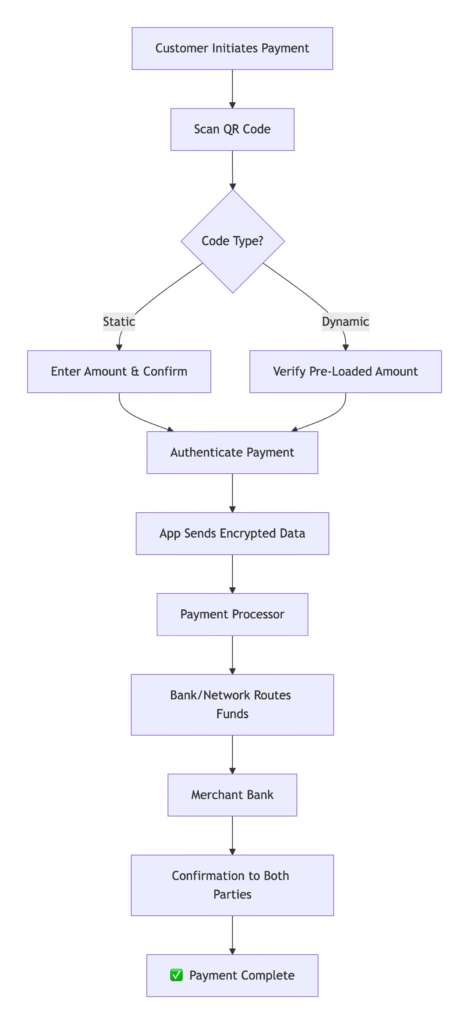
Let’s walk through what happens at each stage:
Step 1: The Scan & Information Retrieval
You open your banking or payment app (like PayPal, Venmo, or your bank’s native app) and point your camera at the merchant’s QR code. This code isn’t just a random pattern; it contains a specific set of information, such as:
- Merchant ID: A unique identifier for the store.
- Payment Gateway Details: The URL of the payment processor.
- Transaction Amount: In the case of a dynamic QR code, the exact amount is already embedded.
Step 2: App Processing & Authentication
Your payment app deciphers the information from the QR code. It then prompts you to confirm the payment amount (for static codes) and authenticate the transaction. This is done via your PIN, biometrics (fingerprint or face ID), or a two-factor authentication. 🔒
Step 3: The Secure Handoff
Once you authenticate, your app packages the transaction details—your encrypted payment credentials, the merchant ID, and the amount—and sends it securely to a payment gateway or processor.
Step 4: Bank Authorization
The payment processor forwards the request to the involved networks (like Visa, Mastercard, or a local real-time payment system). This network routes the request to your bank (the issuer) for authorization. Your bank checks for sufficient funds and fraud, then approves or declines the transaction.
Step 5: Transaction Completion & Confirmation
The approval message travels back through the chain: from your bank, to the network, to the payment processor, and finally to the merchant’s terminal (or app). Within seconds, both you and the merchant receive a confirmation—a “Payment Successful” on your screen and a sound or notification on the merchant’s device. ✅
Step 6: Settlement
While the payment is instant for you, the actual transfer of funds from your bank to the merchant’s bank typically happens at the end of the business day. This batch process is handled by the payment processor.
FAQ: Your QR Payment Questions Answered
Are QR code payments secure?
Yes, they are highly secure. Your actual bank card details are never shared with the merchant or stored within the QR code itself. The code only contains a unique transaction identifier. The payment is authorized by you via your locked phone and PIN/biometrics, adding a strong layer of security.
What if I scan a fraudulent QR code?
This is a real threat, known as “quishing.” Always verify that the QR code is from a legitimate source. Be wary of codes on fliers or in unexpected emails. A good practice is to use a payment app that shows you the merchant’s name before you authorize the payment.
Do I need an internet connection to pay?
Yes, both you and the merchant generally need an active internet connection for the transaction to be authorized and completed in real-time.
What’s the difference between the QR codes on my banking app and the one on WhatsApp or Paytm?
The core technology is the same. The difference lies in the payment rail it uses. Your bank’s app might use a card network (Visa/Mastercard) or a real-time bank transfer system (like UPI in India). Apps like WhatsApp or Paytm are “payment facilitators” that link to your bank account or card in the background.
Can someone hack my phone by me just scanning a QR code?
A simple scan with your camera app typically only reads the code, it doesn’t execute anything. The risk comes when a malicious code directs you to a phishing website or triggers an unwanted action. Never scan a QR code from an untrusted source. For payments, always use the scanner within your trusted payment app.
Why did my payment fail even though I have money?
This can happen due to several reasons: a poor internet connection, the payment app needing an update, a temporary glitch with the bank server, or you may have hit a transaction limit set by your bank.
The Future is Coded 🔮
QR code payments offer a winning combination of low cost for merchants, extreme convenience for customers, and robust security for both. As technology evolves, we can expect even faster and more integrated experiences. The next time you scan to pay, you’ll appreciate the complex digital symphony working behind the scenes to make it all happen in a flash.